AI video storyboard template for a 15-second ad
Give each shot one job, protect exact product details, and approve the hook, proof, offer, CTA, motion, continuity, claims, and delivery before generation begins.
DATIK editorial team · Reviewed by Ilya Kostin · Sources checked 23 October 2026
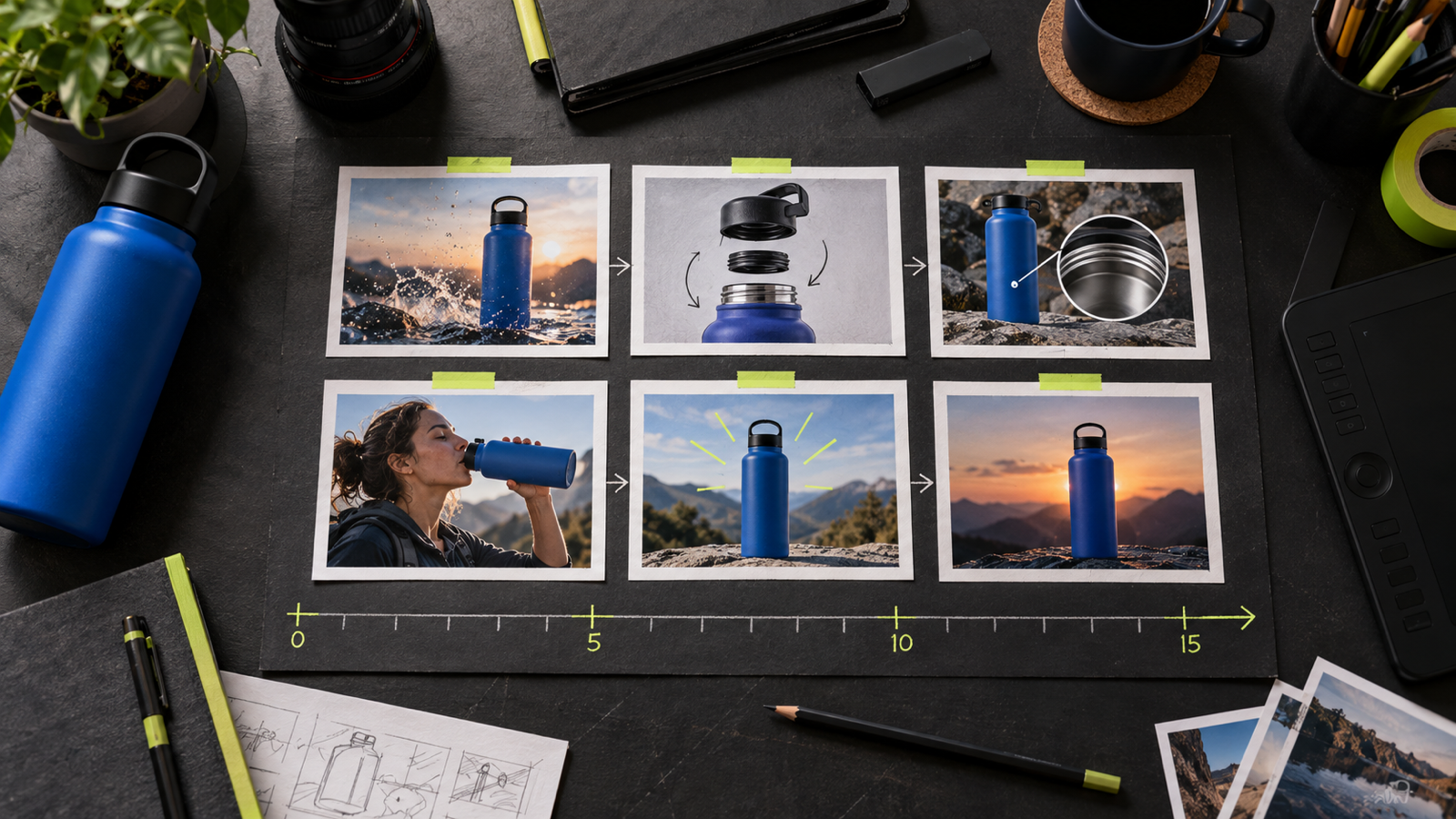
Fifteen seconds can carry one promise. The storyboard below gives each shot a job, then records what the generator, editor, and reviewer need to deliver it.
Google Ads currently recommends 15 seconds for vertical 9:16 video assets at 1080 × 1920 pixels. Meta advises keeping key messages inside the Reels safe zone. Those specifications may change, so confirm the destination before production.
Copy this six-frame storyboard
| Frame | Time | Job | Picture and motion | Copy and audio | Approval test | |---|---:|---|---|---|---| | 1 | 0–2 sec | Hook | Make the buyer's problem, product, or outcome readable in one frame. | One short line or a clear sound cue. | Can a cold viewer identify the subject with sound off? | | 2 | 2–5 sec | Mechanism | Show the product or the real process that creates the change. | Name the feature only if the viewer can see it. | Are product shape, packaging, scale, and interface details accurate? | | 3 | 5–8 sec | Proof | Demonstrate a verifiable feature, approved quotation, or measured result with context. | Add any qualification where the claim appears. | Does the picture support the exact claim? | | 4 | 8–11 sec | Buyer outcome | Show the practical effect for the intended customer. | Connect the outcome to the evidence already shown. | Do product, person, wardrobe, light, and screen direction match the prior shot? | | 5 | 11–13 sec | Offer | Reserve a clean area for the actual offer. | State eligibility, deadline, or starting condition accurately. | Can the business honor every word on screen? | | 6 | 13–15 sec | Action | Hold a readable end card that matches the landing page. | Use one action: shop, book, request a quote, download, or learn more. | Is the destination obvious on a phone? |
The frame count is a planning device, not a platform rule. A product demonstration may use three shots. A single continuous shot may cover all six decisions without six cuts.
Record the production fields under every frame
Put these fields in the shot record, even when the client-facing storyboard stays visual:
- purpose, duration, and delivery aspect ratio;
- approved reference asset and the details that cannot drift;
- subject action, camera motion, and environmental motion;
- spoken copy, on-screen copy, and safe-area note;
- continuity detail carried into the next shot;
- claim, disclosure, and rights check;
- transition, first frame, and required endpoint;
- model, settings, prompt version, output ID, and rejection reason.
Runway's current image-to-video guidance assigns composition, subject matter, lighting, and style to the input image. The text prompt should concentrate on motion and temporal progression. That split belongs in the storyboard: approve the frame first, then specify what moves.
Keep exact product details out of the guessing loop
A generator should not invent a logo, label, interface, or regulated claim that must be correct. Use an approved reference and check the rendered output at full size. When exact typography or packaging keeps drifting, composite the verified asset during editing.
Write rejection notes as observable defects. “Looks wrong” gives the next attempt no direction. “Label lettering changed,” “camera crossed screen direction,” or “end frame cannot hold the CTA” can be fixed and counted.
Plan variants before generation
For an opening test, keep frames 2–6 stable and change the first two seconds. This limits the creative variable to the hook. Producing five unrelated ads changes the hook, proof, pacing, offer, and sometimes the audience at once.
Create separate delivery boards when a late crop would hide the product or CTA. A 9:16 master can be useful, but it does not guarantee a clean 1:1 or 16:9 cut.
Review the board before spending generation credits
Read the storyboard once with the picture column hidden. The claim and action should still form a complete path. Then hide the copy column. The sequence should remain understandable as silent video.
The final review is practical: confirm the landing page, offer, legal qualification, safe areas, product references, and who approves each gate. Generation starts after those items have names attached to them.
Sources and limits
- Google Ads video specifications and format requirements, checked 23 October 2026.
- Meta guidance for Facebook and Instagram Reels ads, checked 23 October 2026.
- Runway Image to Video Prompting Guide, checked 23 October 2026.
- FTC Disclosures 101 for Social Media Influencers, checked 23 October 2026.
Platform specifications and model behavior can change. This template is production guidance, not a promise that a model will execute every planned shot or that an ad will pass review. Legal and disclosure questions should be reviewed for the actual campaign.
Request a DATIK diagnostic to turn one offer into a bounded Video Lab pilot with a storyboard, shot records, approval gates, and delivery files.
Frequently asked questions
Does every 15-second ad need six shots?
No. The six frames separate six decisions. Several can happen inside one continuous shot, or a simple demonstration can use fewer cuts.
Should the storyboard contain exact AI prompts?
Keep the prompt and settings in the shot record. The storyboard should remain readable to a client and editor when the model changes.
Can the same storyboard be cropped for every platform?
Only when composition, type, and safe areas were approved for every delivery ratio. Make a separate board when the crop changes the meaning or hides the CTA.
What should stay fixed when testing several hooks?
Keep the audience, offer, landing page, proof, and frames after the opening stable. Change the hook and label the variant.
Storyboard one 15-second deliverable
Bring one offer, platform, product reference, landing page, and approval owner. We will map the six decisions, shot records, acceptance tests, and delivery files before generation begins.
4300 Biscayne Blvd, Miami, FL 33137 · info@datik.click