Captions and safe zones for vertical video ads
A clean 9:16 file can still fail after the platform adds controls, copy, disclosures and a native CTA. Review the screen and processed upload, not only the edit.
DATIK editorial team · Reviewed by Ilya Kostin · Sources checked 2 November 2026
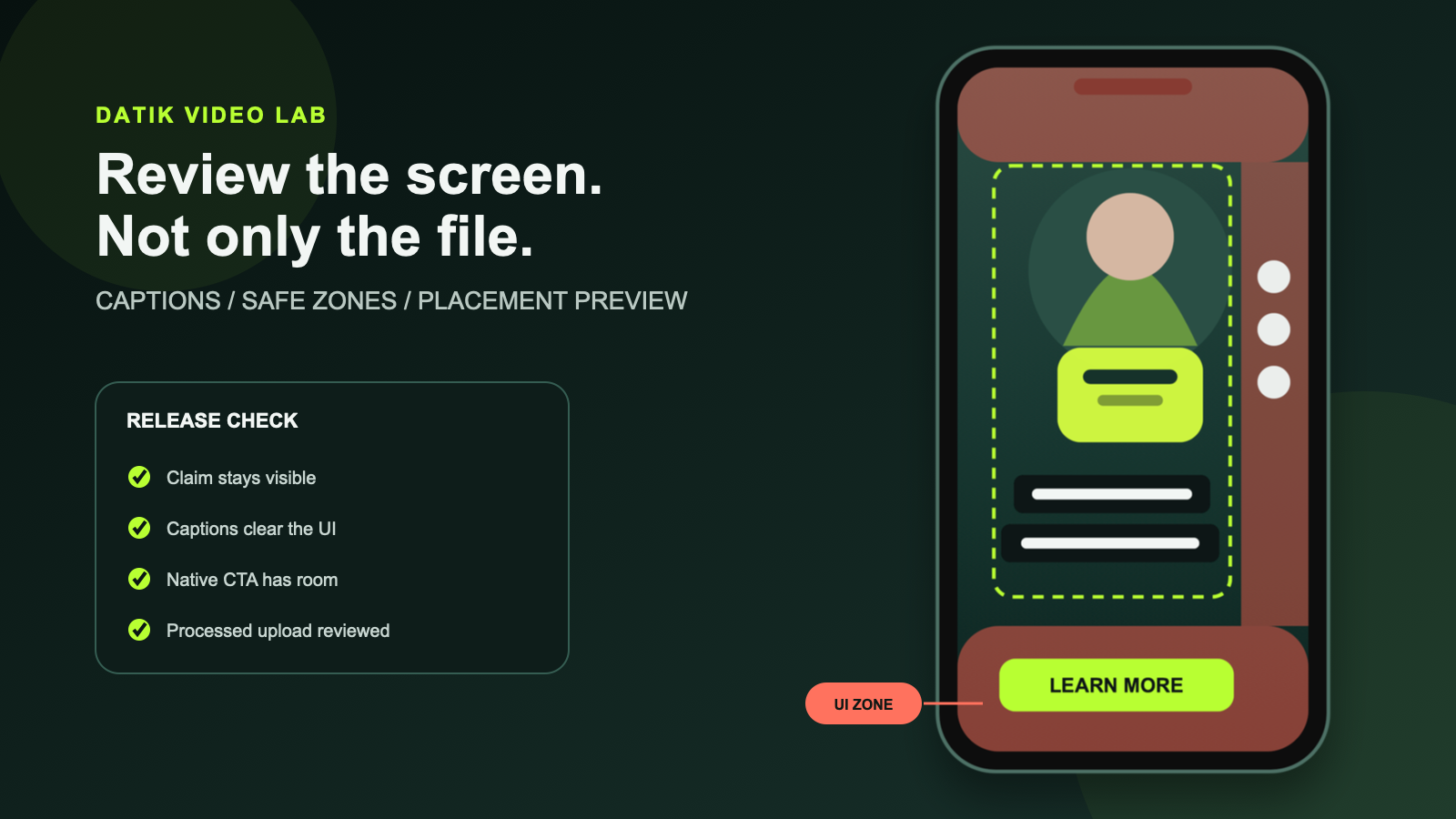
A 1080 by 1920 file can still fail on a phone. The platform adds a profile name, description, engagement controls, disclosure labels and a call-to-action button. Some placements crop or compress the picture. The edit looked clean because the editor reviewed the file, not the screen where the ad would run.
The practical rule is simple: keep essential information away from interface-heavy edges, then inspect the ad in the real placement preview. There is no permanent universal safe-zone template for every platform, campaign type, device and add-on.
The short answer
Build a 9:16 master with extra room around the product and subject. Keep the logo, key claim, product detail, captions and call to action inside a conservative center area. Treat the top, bottom and right edge as changeable interface space. Export a clean master, a burned-caption version and a separate caption file when the platform supports one. Before launch, review the processed upload in every selected placement.
That method is more reliable than copying one set of pixel measurements into every project. TikTok says its safe area changes with format, caption length and interactive add-ons. Google says overlays and buttons can appear in different places across formats, campaign types and screens. Both platforms direct advertisers to their preview tools.
Safe zones protect meaning, not decoration
The safe zone should contain anything that would change the message if it were hidden or cropped:
- the product or service being sold;
- a face when expression or identity matters;
- the brand name or logo;
- an objective claim and its necessary qualification;
- captions needed to understand the audio;
- price, date or eligibility language;
- the final call to action.
A background prop can extend past the safe area. A product label cannot. A decorative word can sit near an edge. A disclosure should not.
Do not assume the middle of the frame is automatically safe. A platform may place a call-to-action panel across the lower portion of the video. Long post copy can reduce the visible area. Interactive cards and shopping controls can occupy additional space. The usable region is a property of the placement, not only the aspect ratio.
Start with the destination placement
Write the planned delivery surfaces into the brief before the first frame is generated or shot. “Vertical social” is not specific enough.
Record:
- platform and campaign type;
- organic post, paid ad or boosted creator post;
- intended placements;
- aspect ratio and duration;
- whether a native CTA, product card or interactive add-on will appear;
- language versions;
- open captions, closed captions or both;
- the owner responsible for the final placement preview.
TikTok currently recommends vertical 9:16 video for its in-feed environment. Its published specifications also explain that safe-zone size depends on orientation, caption length and add-ons. Google recommends 9:16 vertical assets for YouTube Shorts and warns that vertical ads can appear across several surfaces and devices. A Shorts asset may also be displayed outside the mobile Shorts feed.
This is why the brief comes before the overlay. One file may need several delivery versions even when all of them are vertical.
Compose for reframing before generation
Safe-zone problems are cheaper to prevent in the source image than to repair in the edit.
Leave breathing room around the subject. Keep hands, product edges and important movement away from the frame boundary. Generate or capture a little more background than the final composition appears to need. If a scene will be adapted to square or landscape, identify the common protected region before production.
For a talking presenter, reserve a stable caption area that does not cover the mouth, hands or product demonstration. For product work, keep exact packaging and labels large enough to inspect but not so tight that a platform crop removes them. Our reference-image checklist covers the product angles and details that should already be locked before animation.
Do not ask an AI video model to solve layout, caption placement and product accuracy in one generation. Generate the picture cleanly. Add controlled typography and required disclosures during editing.
Write captions for a phone, not a transcript page
Captions are synchronized information. They need to represent spoken content and meaningful non-speech audio when that sound is necessary to understand the video. W3C guidance also notes that captions should not obstruct relevant visual information.
Automatic transcription is a starting point. A person still needs to verify:
- names, product terms and industry vocabulary;
- numbers, prices and dates;
- speaker changes;
- meaningful sound cues;
- timing against the final audio;
- punctuation and line breaks;
- translations and regional spelling.
Break lines at natural phrase boundaries. Keep each caption on screen long enough to read once at normal playback speed. Avoid a rapid sequence of single highlighted words unless the format has a clear creative reason for it. Constant animation can compete with the product and make corrections harder.
Contrast must survive moving backgrounds. A text color that works on the opening shot may disappear over the next one. Use a controlled background, shadow or stroke and test the most difficult frames. Check the captions at actual phone size instead of judging them on a large editing monitor.
Burned-in captions and caption files solve different problems
Burned-in captions give the production team control over type, placement and timing. They remain visible when a platform does not display an accessibility track by default. But the viewer cannot turn them off, and they can collide with interface elements if the placement changes.
A separate caption file can support accessibility, search and viewer controls. It also makes correction and localization easier. Its appearance depends on the player.
For many campaigns, keep three deliverables:
1. a clean master without captions or platform UI; 2. a reviewed open-caption export for placements that need fixed presentation; 3. a timed caption file for platforms and owned pages that support it.
Do not make the burned-in version the only archive master. A future placement may need different typography, a new language or a clean crop.
Keep the platform CTA separate from the creative CTA
The platform may add a button such as Learn More, Shop Now or Install. That button is not visible in the edit timeline. If the video places its own large CTA in the same area, the two compete or overlap.
The creative can state the action in plain language, but the final frame should leave room for the native control. The offer, landing page and platform button must agree. A video that says “Download the guide” should not open a generic home page.
Check disclosure text the same way. A qualification that disappears under a native CTA does not become adequate because it exists in the source file.
Run three reviews, not one
### 1. Clean-frame review
Review the exported file without platform controls. Confirm that captions are accurate, synchronized and readable. Inspect the product, faces, claims, disclosure and final frame.
### 2. Placement-preview review
Upload the asset privately, as a draft or through the platform preview workflow. Turn on every intended add-on. Review the smallest device preview available. Check the opening, densest caption, main claim and CTA frame.
Google explicitly recommends using its safe-zone reference and preview tools because overlays and crops can vary. TikTok recommends previewing the actual effect across device models for formats where the safe area changes.
### 3. Processed-file review
Watch the platform-processed version. Transcoding can change sharpness, caption edges, color and audio. A local export passing review does not prove the uploaded version passed.
Record the reviewer, platform, placement and date. Interface rules change. A screenshot of the approved preview is more useful than a note that says “safe zone checked.”
A practical vertical-video release checklist
### Frame
- The delivery file is 9:16 where the selected placement recommends it.
- The product, face and brand remain clear inside a conservative center region.
- No essential detail touches the top, bottom or right-side interface areas.
- The composition has enough room for the selected native CTA or add-on.
### Captions
- Every spoken claim matches the approved script and audio.
- Names, numbers, prices and dates were checked manually.
- Line breaks follow phrases rather than arbitrary character counts.
- Captions do not cover the demonstrated action or required disclosure.
- Contrast was checked on every background, not only the first frame.
- A clean master and caption file are archived when appropriate.
### Claims and calls to action
- The visual, spoken claim, caption and landing page tell the same story.
- Required qualifications remain readable in the placement preview.
- The creative CTA does not collide with the platform CTA.
- Tracking parameters and the final destination were tested.
### Delivery
- The processed upload was reviewed on a phone.
- Every selected placement was previewed.
- The final file name and version match the approval record.
- A screenshot or recording of the approved preview is stored with the campaign.
Review status and limits
Platform guidance was checked on 2 November 2026. Specifications and interface layouts change. Use the current preview and asset requirements for the exact campaign before export. This article provides a production-control method, not a guarantee that one overlay will remain valid across platforms.
Sources
- TikTok for Business: video advertising guide
- TikTok Ads Manager: reservation in-feed ad specifications and safe-zone notes
- TikTok Ads Manager: TopView specifications and device preview guidance
- Google Ads: square and vertical video, including YouTube safe zones
- Google Ads: YouTube Shorts asset specifications and best practices
- W3C Web Accessibility Initiative: captions and subtitles
- W3C: Understanding captions for prerecorded media
Build the placement into production
Book a DATIK diagnostic and we will map the required formats, caption workflow, preview checks and approval record before the first vertical ad is generated.
Frequently asked questions
Is there one safe-zone template for TikTok, Reels and Shorts?
No. Use a conservative center area during production, then verify the current preview for every selected placement. Controls, caption length, add-ons, campaign type and device can change the usable region.
Should captions always sit at the bottom?
No. The lower part of a vertical placement often contains descriptions, disclosures and calls to action. Choose a consistent caption region that stays clear of the interface and the action in the picture.
Are burned-in captions enough for accessibility?
They can communicate the audio visually, but a separate caption file gives compatible players more control and makes corrections and localization easier. Keep both when the distribution system supports them.
Can one vertical export run everywhere?
It may run, but that does not mean it will render well. Create platform versions when controls, duration, claims, caption placement or calls to action differ.
What should the client approve?
The client should approve the actual version intended for the named placement, including captions, claims, disclosure, landing page and final CTA. Approval of a clean master does not approve every platform crop.
Review the placement before release
Bring the platforms, formats, draft captions, claims, disclosures, native CTA, and approval owner. We will map the safe regions, preview checks, processed-file review, and release record.
4300 Biscayne Blvd, Miami, FL 33137 · info@datik.click