AI video generation log template: control attempts, cost, and approvals
Keep the selected shot tied to its references, settings, usage, decision, edit version, and approval. The record makes later revisions possible without pretending generation is deterministic.
DATIK editorial team · Reviewed by Ilya Kostin · Sources checked 6 November 2026
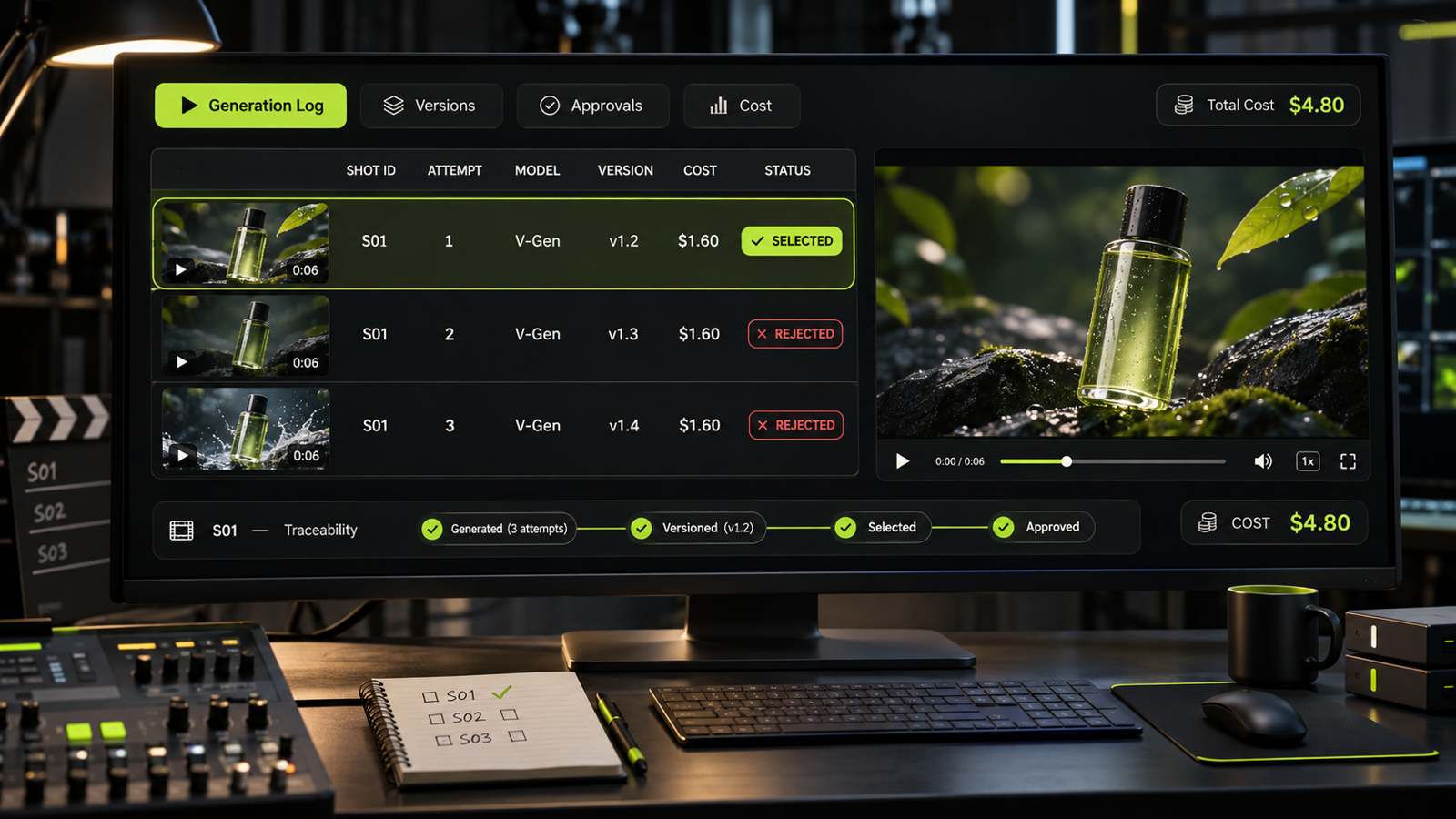
An approved AI video shot is easy to lose inside a folder of near-identical exports. Three weeks later, the client asks for a vertical cut. Nobody can say which reference image, model, prompt, settings, or edit produced the approved frame. The team either guesses or starts generating again.
A generation log keeps that decision trail. It will not make a model deterministic, and it does not turn a prompt into a guaranteed recipe. It does show which attempt was selected, what changed, what the attempt cost, and where the approved file lives.
The log is a production record, not a prompt archive
Prompt libraries answer a creative question: what language tends to produce a useful result? A generation log answers an operating question: what happened on this shot?
That distinction matters once a project has more than one operator or approval round. The useful record connects the brief, references, generation attempt, downloaded asset, edit, reviewer decision, and delivery version. A prompt copied into a document without those links cannot explain why one output was approved and another was rejected.
Use one row for each attempt that reaches review or teaches the team something. You do not need to record every abandoned click. Keep enough rejected attempts to show why the next change was made.
Copy this AI video generation log template
Create one row per useful attempt and keep these fields:
- Project ID and shot ID identify the job and the exact storyboard beat.
- Attempt ID gives every generation a stable reference, such as S03-A07.
- Date, time, and operator show when the attempt was made and who can explain it.
- Intended action states what must happen on screen in plain language.
- Tool, model, and visible version record the generation environment. Write “not exposed” when the service does not reveal a version.
- Prompt and constraints preserve the actual input used for that attempt.
- Reference asset filenames connect the attempt to the approved product, character, location, or style references.
- Rights status records who owns or licensed each reference and whether a person's likeness or voice was authorized.
- Settings capture duration, aspect ratio, resolution, seed, camera control, strength, and other available parameters.
- Output ID and source URL preserve the platform's own identifiers when available.
- Export filename points to the downloaded file in controlled storage.
- Result notes describe visible defects and useful details without vague grades such as “bad.”
- Decision records selected, hold, rejected, or regenerate, plus the reviewer's reason.
- Usage and estimated attempt cost connect the row to a provider credit record or invoice estimate.
- Edit version and approval status connect the generated clip to the actual sequence and final decision.
Keep unavailable values explicit. An empty seed field looks like an omission. “Seed not exposed by provider” tells the next operator that the field was checked.
Add cost without pretending every credit is a dollar
Generation services meter work in different ways. A provider may charge by second, credit, resolution, model, subscription allowance, or a mix of those units. Record the native usage first. Convert it to an estimated dollar cost only when the account plan and overage rules make that conversion defensible.
For each useful attempt, capture:
- native units consumed, such as seconds or credits
- the plan or rate snapshot used for the estimate
- estimated attempt cost, if calculable
- whether the attempt was reviewed, selected, or discarded
This separates generation spend from editing labor and from subscription capacity that would have expired unused. It also prevents false precision. If the provider does not expose attempt-level usage, record the gap and reconcile the project total against the billing export.
The log can then answer practical questions. Did the product close-up consume most attempts? Did a late reference change trigger regeneration? Did the team approve a shot before producing alternate crops? Those answers are more useful than a single blended cost-per-video number.
For a broader budget model, use the AI video production cost guide. The generation log supplies evidence for that estimate. It does not replace the estimate.
Use stable IDs from storyboard to final export
The filename “final-final-3.mp4” tells the next editor almost nothing. Give the shot and attempt stable IDs, then carry them into filenames and review notes.
A workable pattern is “project_shot_attempt_ratio_version.ext.” A selected vertical export might be “launch_s03_a07_9x16_v02.mp4.” The edit sequence can refer to S03-A07, and the approval note can identify the same attempt without relying on a thumbnail.
The naming rule matters less than consistency. Do not rename source exports after reviewers have linked to them. Add a new delivery filename while preserving the source ID in the log.
This is also where the storyboard and the production workflow meet. The storyboard defines the shot's job. The log records the attempts. The edit and approval records show what shipped.
Record decisions, not just settings
Settings explain how an attempt was requested. Decision notes explain why it moved forward.
Write observations that another operator can verify:
- rejected because the label text changes between frames
- hold for client review because product shape is correct but hand motion is unstable
- selected for the 9:16 cut because the subject remains inside the caption-safe area
- regenerate after the approved package reference changed on November 5
“Looks good” cannot guide a later revision. A short, concrete reason can.
Approval should point to a specific asset and edit version. If a reviewer approves S03-A07 but the editor later replaces it with S03-A09, the approval no longer covers the sequence. Our guide to AI video revision rounds explains how to separate corrections, creative revisions, and scope changes before that confusion reaches the invoice.
Keep the log beside the assets
A spreadsheet works for a small team. A database or production tracker may work better when the volume grows. In either case, keep stable links between the row, source export, references, edit version, and approval evidence.
Do not rely on a provider's generation history as the only record. Accounts change, histories can be hard to search, and the platform view may not preserve your internal shot name or approval context. Download selected and near-selected outputs to controlled project storage. Preserve the provider's output ID in the log.
Set a retention rule before the first generation. The log may contain unreleased products, personal information, licensed references, client comments, and commercially sensitive prompts. Restrict access to the people who need the record. Store credentials and access tokens somewhere else.
Provenance metadata and the internal log solve different problems
C2PA Content Credentials can carry verifiable provenance about how an asset was created and changed. Adobe describes Content Credentials as durable metadata that can show whether content was generated by AI or edited in a supported tool. This is useful disclosure and attribution data.
It does not replace the internal production log. A client approval reason, estimated attempt cost, rejected take, or change-order decision may not belong in public-facing provenance metadata. Keep the detailed operating record internally, then apply supported disclosure and provenance controls to the published asset.
NIST's Generative AI Profile is a voluntary risk-management resource across the AI lifecycle. It supports the broader case for documented governance and evaluation. It does not prescribe this template or promise that a log will lower production cost.
Start with one costly shot
Do not wait for a new software system. Pick the shot that generated the most debate on the last project. Reconstruct its attempt IDs, references, outputs, decisions, and usage. The missing fields will show what the next project needs to capture at generation time.
DATIK Video Lab can adapt the log to your storyboard, generation tools, review stack, and delivery rules. Request a scoped pilot and bring one real brief. We will map the record before pricing repeated production.
Sources and review limits
- NIST AI Risk Management Framework: Generative Artificial Intelligence Profile
- C2PA Content Credentials technical specification, version 2.5
- Adobe Content Credentials overview
Sources were checked on November 6, 2026. Tool interfaces, model labels, usage units, and history retention can change. Verify the fields exposed by the service used on the project. This article does not claim that the template guarantees reproducibility, reduces cost, or satisfies a legal disclosure duty.
Frequently asked questions
Should every failed generation go into the log?
No. Record attempts that reach review, affect a decision, consume material budget, or teach the team what to change. A count of total attempts can be useful even when trivial failures are not documented row by row.
What if the AI video tool does not expose a seed or model version?
Write “not exposed,” preserve the provider's output ID and downloaded file, and record every available setting. The log improves traceability, but it cannot recover controls the provider does not supply.
Do prompts belong in the client delivery?
The contract should answer that question. A client needs the agreed production record, rights information, and approved deliverables. Proprietary working prompts and internal rejection notes can be handled separately when the scope says so.
How should a team calculate cost per attempt?
Record native usage first, then apply the documented plan or overage rate that was active when the attempt ran. If the provider does not expose attempt-level usage, leave the attempt cost unknown and reconcile only the verified project total.
Can Content Credentials replace a generation log?
No. Content Credentials can carry provenance and disclosure information in supported workflows. The internal log also holds production decisions, costs, rejected attempts, review notes, and approval links that should not all be public.
Install the record before generation expands
Bring one brief, the current generation tools, review owners, and delivery formats. We will map the attempt log, rights fields, cost record, approval path, and archive for a scoped pilot.
4300 Biscayne Blvd, Miami, FL 33137 · info@datik.click